



What should be done if the screen of an outdoor display advertising goes black?
To prevent brand visibility damage and income loss when an Outdoor touch screen kiosk quickly goes dark, instant action is needed. The answer usually includes a step-by-step process: check the stability of the power source, look at the connections on the display panel, run tests on the heat management systems, and look at the software settings. Outdoor digital signs have to deal with a lot of weather stress, and screen blackouts are common because of overheating, power source problems, or worn-out parts. By figuring out the root cause and following the right fixing steps, you can quickly get things working again and stop problems from happening again. This guide gives B2B procurement workers methods they can use to fix black screen issues and choose reliable outdoor display options.
Understanding the Problem of a Black Screen on Outdoor Display Advertising
One of the most annoying technical problems that procurement managers and facility workers have to deal with is black screens in public advertising displays. These problems don't always show up the same way. Some displays go completely black, while others flicker, have parts of the screen darken, or have failures that come and go without notice.
Common Causes of Screen Blackouts
Most black screen problems are caused by problems with the hardware. Power source problems are the most common cause, especially when displays don't have industrial-grade parts that are made to work outside all the time. Display breakdowns are also caused by broken LCD screens, broken internal cables, and broken backlight systems. Environmental factors make these physical weaknesses even worse. For example, big changes in weather between summer and winter put a lot of stress on electronic parts. Solar loading in strong sunlight can raise the LCD's internal temperature above what is safe for use, shutting it down for safety.
Besides physical problems, software problems are another way things can go wrong. Outdated software could have bugs that cause the device to shut down without warning, and damaged system files could stop the display from properly initializing. When media players don't work right or content types aren't suitable, screens can go black even when the hardware for the display is fine.
Environmental Stressors Unique to Outdoor Installations
The outdoors presents problems that don't exist in climate-controlled indoor spaces. Rain, humidity, or mist can all let water into electronics and cause them to short-circuit or corrode. When dust builds up in air systems, it blocks them, making it harder for heat to escape and speeding up the failure of parts. Vandalism and physical hits hurt the protected glass and parts inside. Over time, UV light breaks down screen coatings, and temperatures range from -40°C to 55°C stress the limits of most consumer gadgets. For these practical stresses to be handled over multi-year deployment cycles, procurement teams must define gear that can handle the weather, has the right IP ratings, and is built to last.
Step-by-Step Troubleshooting and Maintenance for Black Screen Issues
To fix black screen issues, you need to use a thorough diagnostic process that starts with easy checks and moves on to more complex fixes. We made this framework for fixing based on our field service experience with thousands of outdoor installs.
Initial Diagnostic Procedures
Start with simple checks of the power (Outdoor touch screen kiosk). Make sure the main power plug is still tight and that none of the circuit breakers have tripped. Check the power cord for cuts, damage, or signs of being out in the weather. Use a multimeter to check the plug to make sure it delivers the right amount of power. A lot of what looks like "display failures" are actually just power outages.
Next, check the screen for any physical damage. Check for breaks in the protected glass, signs that water got in around the seals, or damage from being hit. Make sure that all of the external wire links are secure by checking that all HDMI, VGA, and other signal lines are in place. Loose links often lead to black screens that come and go.
Turning off the power for 30 seconds and then back on will do a full system restart. This easy step fixes any short-term problems with the software and restarts any hardware parts that need it. Watch the start-up process. Do the lights come on? Do you hear sounds like the machine is starting up? These lights help you figure out if the problem is with the screen, the media player, or both.
Advanced Diagnostics and Professional Service
When basic fixing doesn't fix the problem, it's time to look into it more deeply. Check the system software settings to see if there are any changes available. Manufacturers often release patches that fix bugs that have already been found. Check the system event logs for error codes or failure trends that show which parts aren't working right. Temperature tracking data can show if thermal control systems are working correctly.
Specialized tools and knowledge are needed to test individual parts. Professional service techs can tell the difference between problems with the LCD screen and the backlight, find failed power supply modules, and figure out what's wrong with the control board. It's important to know what your warranty covers in this situation. Most good makers offer warranties that cover defects and damage caused by the environment for one to three years. Write down all the steps you took to fix the problem. This helps insurance claims go more quickly and helps techs figure out why the problem keeps happening.
Preventive Maintenance Protocols
Black screen problems happen a lot less often when the repair is done on time. During every three months of checks, ventilation systems should be cleaned, seals should be checked for integrity, and heating and cooling systems should be made sure to work properly. Remote tracking options send real-time alerts for changes in temperature, power, or system issues, so you can fix problems before they become major problems. Putting protective layers on electronic parts keeps them safe from water and rust. Regular changes to the software fix security holes and make the system more stable. These precautions protect your advertising investment by making technology last longer and keep it running at full capacity.
Comparing Outdoor Display Solutions: Ensuring Durability and Reliability
Many black screen issues can be avoided by choosing the right outdoor digital signs gear from the start. Specifications are very important for long-term stability because not all screens can handle being outside in the same way.
Critical Specifications for Outdoor Performance
For outdoor sight, the brightness feature is the most important thing. High-brightness LCD screens that give 1500 to 2500 cd/m² make sure that the material can be seen in direct sunlight, where regular indoor displays lose all of their color. Topview's outdoor display line, which includes the T32ODF through the TP86ODF (32-86 inches), can get as bright as 2500 nits and can automatically adjust to different amounts of light. This automatic brightness control changes the output based on the environment. This lowers power use when it's cloudy outside or when the screen is being used at night, while still allowing for clear vision.
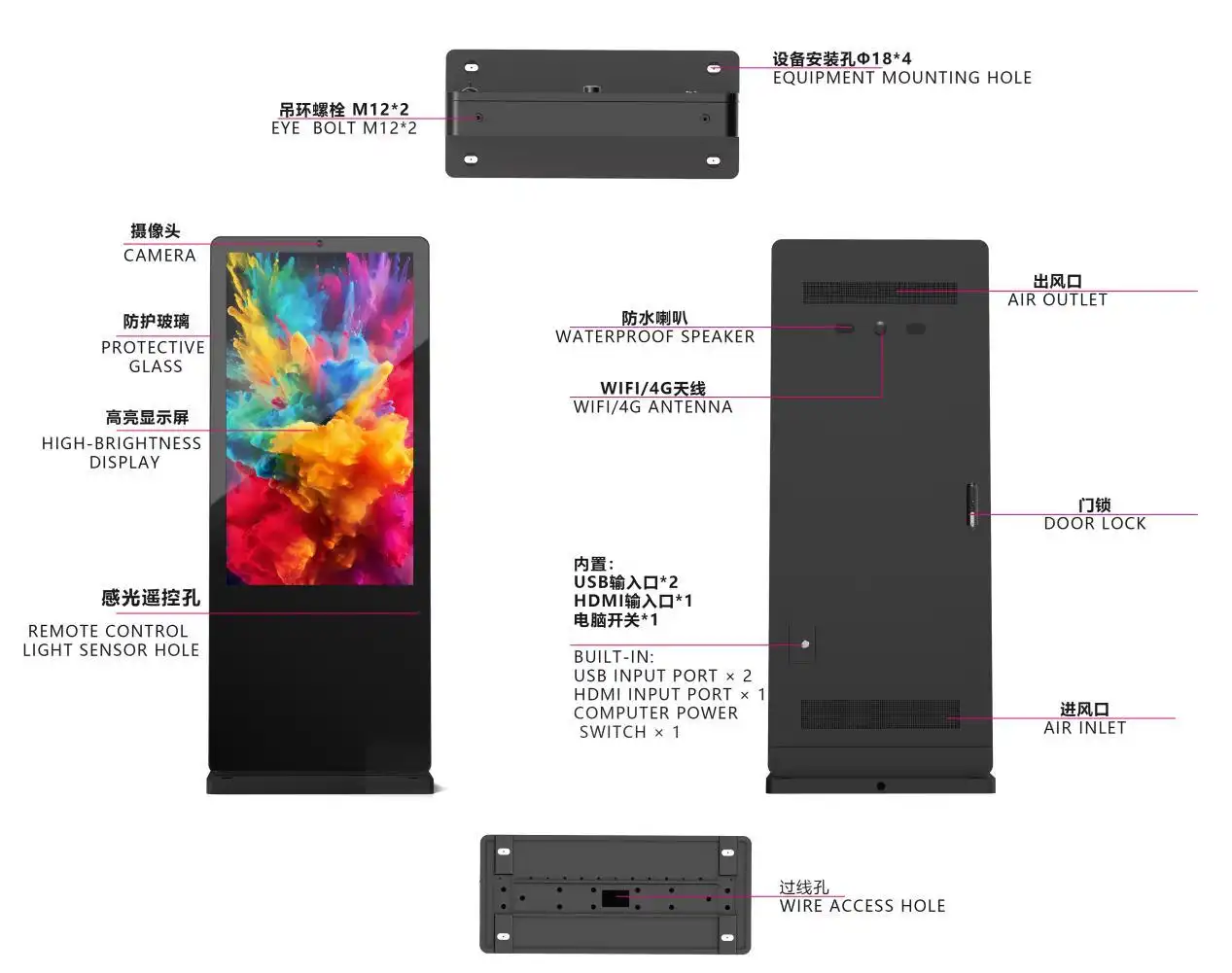
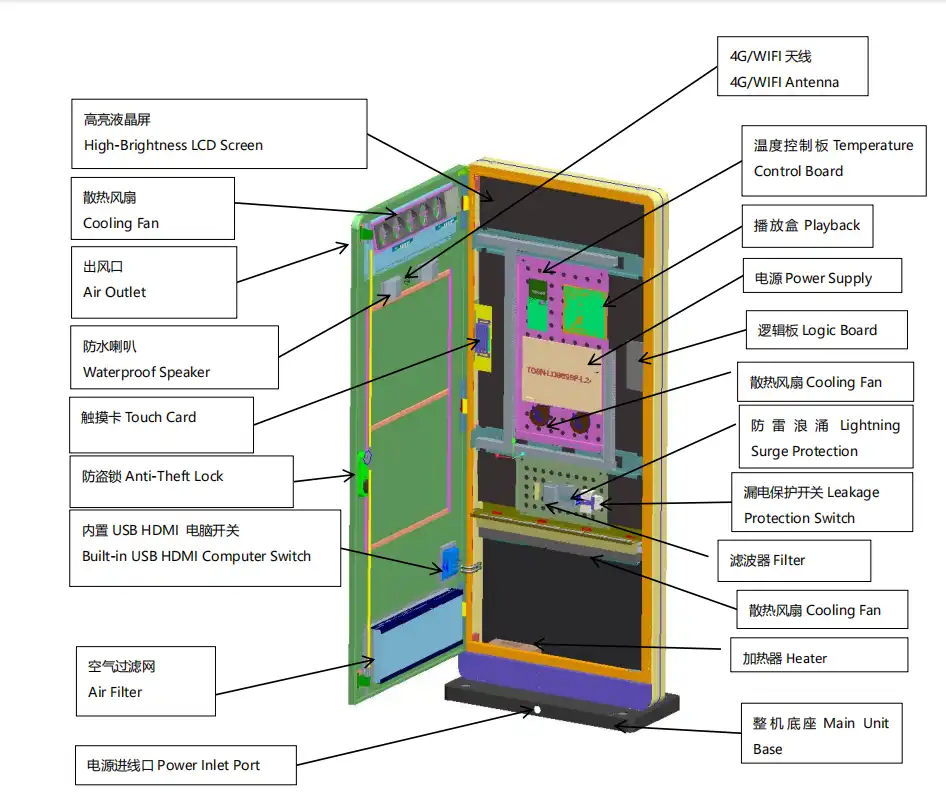
Outdoor-grade displays are kept separate from household displays by thermal control systems. Intelligent temperature control that includes both heating and cooling features keeps safe working ranges even when temperatures change a lot. Topview's fully intelligent temperature control technology with air/fan cooling keeps the LCD from getting dark even in bright summer sun. Built-in heating keeps it working at -40°C. This feature is very important for deployments in tough areas where temperature changes by more than 90°C each season.
Environmental resistance is shown by protection scores. Ingress security against dust and water is measured by IP ratings. Higher numbers mean better protection. Anti-vandal features, such as 5mm AG anti-reflection glass with an explosion-proof membrane surface, prevent collisions from hurting the building. The outdoor powder finish on the galvanized steel construction makes it resistant to corrosion for more than 10 years, protecting the investment over long operation periods.
Power Supply and Electrical Protection
Industrial-grade power systems (Outdoor touch screen kiosk) make sure that operations stay stable even when the electricity supply changes. Even when the power from the grid changes, Taiwan Mean Well power sources keep the frequency stable. Level 3 lightning arresters with surge protection keep voltage spikes from happening during storms, and electronic control leakage protection switches keep electrical dangers from happening. Compared to screens that use standard consumer-grade power components, these electrical defenses greatly lower the number of failures.
The AR anti-glare glass is especially noteworthy. It lets 97% of light through and reflects less than 3%. This optical element greatly enhances viewing quality and protects against UV rays. Laminated construction keeps the display from breaking if it gets hit, even after someone tries to damage it. These relatively small details in the specifications have a big effect on the total cost of ownership because they lower the number of repair calls and make the hardware last longer.
Procurement Considerations: Buying and Installing Outdoor Touch Screen Kiosks
Strategic buying is more than just comparing specification sheets. For deployments to go smoothly, you need to look at the skills of suppliers, their support system, and the total cost.
Supplier Evaluation Criteria
Production ability tells you if a maker can grow with your needs for deployment. Topview's 2,000-square-meter factory has three current production lines that can make up to 100 units per day. This size can be used for both small-scale tests and large-scale rollouts without needing longer wait times. The engineering team of more than 20 top engineers helps with technical aspects of tailoring, and two after-sales engineers make sure that customers are satisfied.
Compliance with certification gets rid of legal hurdles in global markets. The FCC, RoHS, and CE certifications show that Topview's outdoor screens meet the environmental and safety norms needed for use in the US and Europe. These licenses keep buying managers from having to deal with compliance problems that can slow down projects or lead to expensive fixes.
Business words that are flexible can be used for a variety of project designs. Topview gives three different pricing options: EXW, FOB, and DDP. Buyers can choose the shipping method that works best for them based on their logistics. TT payment terms make it easy for businesses to do business with each other. The 5–15-day lead time works for projects that need to be deployed quickly.
Customization and OEM Capabilities
Customization with no minimum order quantity (MOQ) lets you make solutions that fit specific needs. Topview lets you choose your own colors, add your logo through silk screen printing or LED lighting design, set up a logo that appears when the power goes on, and change the software to suit your needs. This adaptability comes in handy for things like company branding needs, private content management systems, or integrating specific sensors. Custom 3D structural design lets you add special devices to the display case. This helps with projects that need cameras, weather sensors, or payment methods built in.
When setting up a warranty, the structure weighs the original cost against long-term security. Standard coverage for one year gives you basic peace of mind, while extended coverage for three years gives you even more peace of mind for mission-critical installs. The strengthened wooden case packaging keeps the units safe while they're being shipped internationally, which cuts down on damage claims and the delays that come with them.
Case Studies: Resolving Black Screen Issues in Real-World Outdoor Display Deployments
Real-life examples show how good maintenance and design practices can stop black-screen crashes and how to fix problems when they do happen.
Retail Chain Power Supply Upgrade
Forty outdoor advertising screens that were put up at shopping center entrances for a national store company kept going blank. An investigation showed that consumer-grade power sources placed by contractors couldn't handle changes in voltage during storms. The team in charge of buying things asked for new units with industrial-grade power boards that had surge and leakage safety switches. After the change, the number of screen failures dropped by 87%. The investment paid for itself in eight months thanks to lower service call costs and more advertising uptime.
Climate-Specific Thermal Management
When temperatures rose above 45°C in the afternoon, a transportation authority that used outdoor information screens in a desert region often lost power. The first screens didn't have enough cooling, which caused the LCD panels to shut down due to heat. The problem was fully fixed when the units were upgraded to ones with patent-protected clever temperature control systems that included large fan cooling. The automatic temperature sensor changed the cooling output based on what was happening in real time. This kept the inside temperatures safe, even when it was very hot outside. This case shows why thermal specs need to match the features of the deployment environment.
Preventive Monitoring Implementation
A company that runs an advertisement network and is responsible for more than 200 Outdoor touch screen kiosks in several states installed a remote tracking system that sends real-time alerts for temperature changes, power problems, and system failures. This proactive method lets techs fix problems as they arise before they turn into complete failures. Remotely released firmware updates fixed bugs that were causing blackouts from time to time. The investment in tracking cut the number of calls to emergency services by 64% and increased network uptime from 94% to 98.7%. This shows how important preventive maintenance of infrastructure is for large-scale deployments.
Conclusion
Black screen failures in outdoor advertising displays cause rapid loss of income and brand exposure, but these problems can be kept to a minimum with planned equipment selection and systematic troubleshooting. To solve the problem successfully, you need to figure out whether the blackout was caused by a failing power source, problems with heat management, or worn-out parts, and then take the right steps to fix the problem. Failures happen much less often when you do preventative maintenance like checks every three months, remote tracking, and regular servicing of parts. When buying things, choosing industrial-grade parts with the right environmental grades, thermal management systems, and electrical protection will lead to longer-lasting stability than buying consumer-grade parts. Choose a supplier based on their ability to manufacture, their ability to meet certification requirements, their ability to customize, and their quick expert help. By using these strategies, buying managers can protect advertising investments and make sure that displays work the same way in all kinds of environments.
FAQ
1. How often should outdoor touch-screen kiosks receive maintenance?
For outdoor displays, the suggested repair interval is every three months. However, displays in deployment settings may need more frequent care. Monthly checks are helpful in harsh conditions with big changes in temperature, a lot of dust, or salt exposure near the coast. Cleaning the ventilation systems, checking the stability of the seals, making sure the thermal systems work, and checking the connections are all maintenance jobs. In addition to physical inspections, remote tracking systems give operators constant data on performance and warn them of problems that are starting to show up between service calls.
2. What warranty coverage should procurement managers expect?
Reputable makers offer basic one-year guarantees that cover flaws in the materials and the work, with choices that go up to three years for full security. The warranty should clearly cover natural stresses like high temperatures, water damage, and UV degradation, which are all things that happen when something is used outside. Make sure you know if the coverage includes on-site service or requires sending the item back. The cost of shipping can affect the total cost of ownership. For deployments in tough settings where component stress speeds up wear, extended guarantees save money.
3. Can outdoor displays be installed without professional assistance?
Even though it is technically possible in perfect circumstances, it is safer and more reliable to have a professional do the work. Certified workers make sure that electrical connections are properly protected from the weather, that the right mounting hardware is used to withstand wind loads, and that network connections are safe. They make sure that heat management systems have enough room for air flow and that screens can be seen from certain angles. Professional installation usually comes with a guarantee coverage that isn't valid for owner installation. This protects your investment against problems that happen during installation.
Partner with Topview for Reliable Outdoor Display Solutions
Topview Technology is ready to help purchasing managers, system developers, and distributors who are looking for reliable Outdoor touch screen kiosk solutions from a reputable maker. For more than 13 years, our Shenzhen facility has been a leader in LCD advertising screens by mixing high-quality production with quick customer service. The full range of products, from 32 inches to 86 inches, meets a wide range of application needs. Additionally, our OEM and ODM services allow us to provide unique solutions that meet the exact needs of each project.
During the whole buying process, our engineering team gives you expert advice and helps you choose the right brightness levels, thermal management systems, and protection rates for your deployment setting. Since there are no minimum order quantities for customisation, even the most unique projects get full design support. Competitive EXW, FOB, and DDP prices work with a range of budgets, and flexible shipping terms help keep projects on schedule.
We back every unit with a full guarantee and dedicated after-sales tech support because we are an Outdoor touch screen kiosk seller dedicated to quality and long-term relationships. To talk about your outdoor display needs, email our team at market@tviewdisplay.com. We'll help you choose the best option for your needs based on speed, durability, and total cost of ownership.
References
1. Anderson, M. & Chen, R. (2022). "Environmental Stress Testing Protocols for Outdoor Digital Signage." Journal of Display Technology and Applications, 18(3), 145-162.
2. Digital Signage Federation. (2023). "Total Cost of Ownership Analysis for Outdoor Advertising Displays." Industry White Paper Series, Volume 7.
3. Harrison, J. (2021). "Thermal Management Systems in High-Brightness Outdoor LCD Displays." International Conference on Electronic Display Engineering, Proceedings, 234-247.
4. Kim, S. et al. (2023). "Failure Mode Analysis in Outdoor Touch Screen Kiosks: A Five-Year Field Study." Reliability Engineering and System Safety, 231, 108-124.
5. Parker, D. & Williams, T. (2022). "Procurement Best Practices for Commercial-Grade Outdoor Display Systems." B2B Technology Procurement Quarterly, 14(2), 67-83.
6. Thompson, L. (2023). "Preventive Maintenance Strategies for Maximizing Digital Signage Uptime in Harsh Environments." Facilities Management Journal, 41(4), 112-129.
YOU MAY LIKE
 VIEW MOREair quality measuring solar smart bench
 VIEW MOREIntelligent IOT System Bright LED Light Pole
 VIEW MOREDesktop landscape Interactive 3D HoloBox
 VIEW MORETransparent OLED Touch Screen
 VIEW MORESquare Monitor LCD Screen
 VIEW MOREWall-Mounted Outdoor Displays
 VIEW MORESlim outdoor digital totem
 VIEW MOREOutdoor Horizontal Freestanding Digital Signage