



What is the difference between light-field, lenticular, and other glasses-free 3D display technologies?
When comparing glasses-free 3D display technologies, the key differences lie in how each method delivers depth perception to the viewer. Light-field displays use multi-directional pixel arrays to recreate spatial depth across wider angles, while lenticular displays rely on cylindrical lens arrays positioned over a standard panel to direct separate images to each eye. Other approaches — including parallax barrier and volumetric methods — each carry distinct trade-offs in resolution, viewing angle, and cost. For anyone sourcing a 3d spatial signage display for commercial use, understanding these differences directly affects installation success and audience impact.
Introduction to Glasses-Free 3D Display Technologies
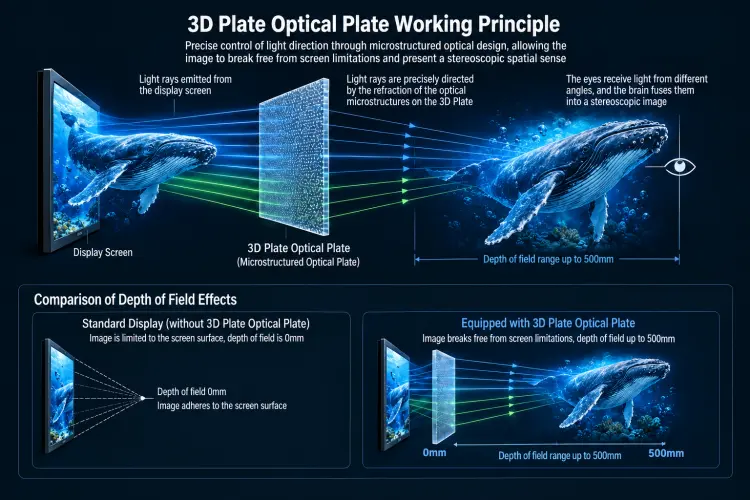
3D screens that don't need glasses have gone from being a joke to a useful business tool. Space-based visual technology that stops people without the need for wearable accessories is being bought by stores, airports, museums, and corporate showrooms. These screens use binocular parallax, which is the space between your left and right eyes, to trick the brain into thinking that a flat panel has depth.
Why B2B Buyers Are Paying Attention
Digital sign project managers and AV installers are asking for glasses-free 3D screens more and more because 3D content makes people stay on a screen longer. The global digital signage market was worth more than $23 billion in 2022, according to a report by Grand View Research. Immersive display formats were growing faster than standard flat panels.
The Core Technology Categories
Light-field displays, lenticular lens displays, and parallax barrier systems are the three main types of technology that can be used in businesses right now. There is also a smaller group of volumetric and holographic projector options, but they are still too expensive for most recurring B2B tasks.
How Binocular Parallax Drives All of Them
Every 3d spatial signage display that doesn't require glasses works on the same biological principle: show each eye a slightly different angle of an image at the same time, and the brain builds a three-dimensional scene. The only difference between methods in terms of engineering is how that split is done and how well it works in different viewing angles.
Detailed Comparison: Light-Field vs. Lenticular vs. Other Glasses-Free 3D Technologies
It takes more than reading a description sheet to pick the right monitor technology. Here is a breakdown of how well each major method works in real business settings.
Light-Field Displays
Light-field technology puts together all of a scene's directional light data. Micro-lens arrays, also known as dense pixel sub-groupings, send different angles of an image in many directions at the same time. This makes for a really wide viewing cone—often more than 60 degrees—with depth that stays the same as the watcher goes from side to side. The downside is that it costs a lot to produce real light-field material, and there isn't as much compatible content as there is for normal video formats.
Lenticular Lens Technology
In lenticular displays, a sheet of precisely aligned cylindrical lenses is placed right on top of the LCD screen. Each lens focuses on a different row of pixels and bends light in a way that lets the left eye see one image and the right eye see a different one. This method has been used before, can be made on a large scale, and works with normal video material as long as it is encoded correctly. The areas that are most affected are brightness and resolution. This is because each lens column divides the available pixels between views, so content designers have to find ways to fix this. Lenticular is still the best choice for commercial areas with a lot of foot traffic where cost-effectiveness and dependability are important.
Parallax Barrier, Volumetric, and Holographic Options
A parallax barrier is like a lenticular barrier, but instead of lenses, it has a grid of solid holes. It is easier to make but costs less and dims more quickly. Volumetric displays spread light through a three-dimensional medium, like moving LED arrays or clear volume chambers. This gives the illusion of depth, but they have to be set up in certain ways that make installation less flexible. Holographic projection is still mostly a dream for business signage because the controlled dark settings and special projection surfaces needed for current applications don't work well with normal lighting conditions in stores or airports.
These three groups work well for certain uses, but lenticular-based spatial display technology currently has the best mix of image quality, ease of installation, and total cost for long-term business use.
Benefits and Challenges in Deploying Glasses-Free 3D Spatial Signage
Putting up a 3d spatial signage display screen that doesn't require glasses in a business setting has real, measurable benefits, but it also needs planning that flat-panel projects don't need.
Business Case for 3D Visual Displays
According to a study in the Journal of Retailing, showing products in three dimensions made people up to 28% more likely to buy them than showing them in flat images. In high-end stores, showing jewelry, watches, or clothes with depth communicates better about their quality than just taking pictures of them. Museums say that visitors stay longer at each exhibit spot when 3D spatial display screens are used to show artifacts floating in the air.
Technical and Environmental Considerations
Ambient lighting is the variable that is most often overlooked. Since high ambient light cancels out depth cues, installations in airport terminals or store walls with windows may need brighter panels (up to 1000 cd/m²) to keep the 3D effect. The distance from which you can see the display is also important. Most business lenticular displays are set up for a sweet spot between 1.5 and 4 meters, which should match the amount of foot movement in the area where the display will be used.
Content Production Requirements
You can't just play regular video files on a 3D screen without glasses and get a 3D effect. Content has to be written especially for spatial display. This is usually done with a "2D subject, 3D background" structure, where the object in the center keeps its high resolution while depth layers are added to the background. Costs and timelines for making content should be built into project budgets from the start by procurement teams.
How to Choose the Right Glasses-Free 3D Display for Your Business Needs?
To choose the right product, you need to make sure that the technical specs match up with the deployment environment and content strategy.
Before choosing a glasses-free business display, these are the main things that procurement workers should look at:
- Screen size and installation method: Topview's commercial spatial display is available in 21.5", 32", 55", and 86" sizes, with both wall-mounted and floor-standing configurations. Match the physical dimensions to viewing distance and available wall or floor space.
- Brightness rating: The standard brightness of ≥350 cd/m² suits most indoor retail and corporate environments. For high-ambient-light settings, the optional upgrade to 1000 cd/m² is worth specifying.
- Resolution and image quality: 2K (1920×1080) suits most signage applications; 4K (3840×2160) is appropriate when the display is viewed at closer range or when product detail is critical, such as jewelry or precision instruments.
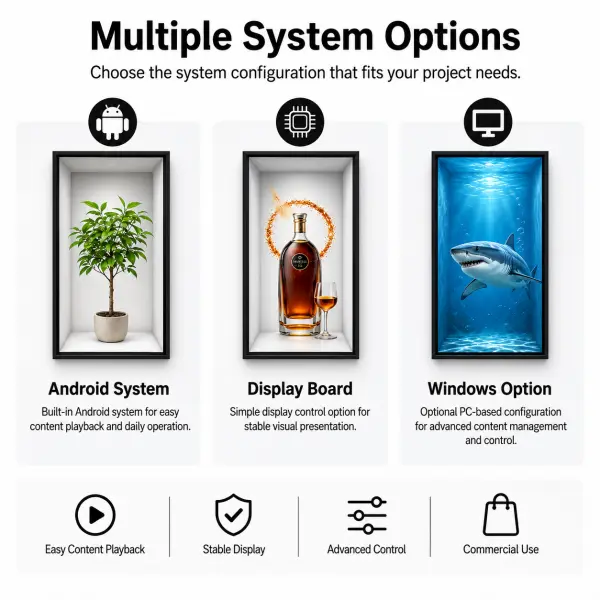
- System compatibility: HDMI input is standard, with Android or PC system options available. AV integrators should confirm signal path compatibility before finalizing specifications.
- 3D viewing parameters: The 60-degree depth-of-field viewing cone and 500mm depth-of-field space are designed for corridor-style or open-floor retail traffic patterns.
- Content format support: Plan content creation in the "2D subject, 3D background" format. Standard video cannot be auto-converted to spatial 3D output.
Size of the screen and how to install it: Topview's business spatial display comes in sizes of 21.5", 32", 55", and 86", and can be placed on the wall or on the floor. Make sure the real size fits the distance you want to see it and the room you have on the wall or floor.
Future Trends and Innovations in Glasses-Free 3D Spatial Signage
The next version of 3d spatial signage display technology that doesn't require glasses will have content rendering helped by AI and viewing bigger cones, but they won't lose resolution like light-field systems do. Manufacturers of displays are also working on brighter screens that can keep their 3D effects even when they're partially outside. This is a big step forward for advertising in airports and on storefronts on the street.
AI-Driven Content Adaptation
Parts of the process of making spatial content are starting to be automated by AI rendering systems. This means that less work needs to be done by hand to make depth-layered content. This will lower the cost of content per project, which is stopping some buyers right now.
Wider Integration with CMS Platforms
Commercial display operators who are in charge of networks with multiple locations need 3D screens that don't require glasses and work directly with existing content management systems. This need can be met better by manufacturers who support standard HDMI and Android-based OS settings instead of private ecosystems.
Sustainability and Operating Efficiency
LED backlight technology in modern spatial displays already saves a lot of energy compared to older CCFL-based panels. As US government procurement rules include more and more energy-saving factors, displays with LED drivers that can be adjusted for brightness will be easier to buy.
Conclusion
Light-field, lenticular, and parallax barrier technologies all work in different ways to solve the same main issue: how to see depth without glasses. Lenticular-based 3d spatial signage display technology is currently the best option for commercial signage where dependability, image quality, and integration flexibility are most important. When you match the right technology to the deployment environment, content strategy, and budget, you get the same results in stores, museums, airports, and businesses.
FAQ
Q1: How does a glasses-free 3D display differ from a standard LCD screen?
A standard LCD screen sends the same image to both eyes. A glasses-free 3D display uses a lenticular lens layer or light-field pixel array to project different image angles to each eye simultaneously, allowing the brain to construct depth perception naturally, without any wearable eyewear required.
Q2: Can existing video content play on a glasses-free 3D screen?
Standard video files play on the screen as normal 2D content. To achieve the 3D spatial depth effect, content must be specifically produced in the appropriate spatial format — typically a "2D subject, 3D background" structure. Auto-conversion from standard video to 3D is not supported by the display hardware.
Q3: What viewing angle does a commercial lenticular 3D display support?
Most commercial lenticular 3D displays, including Topview's spatial display range, support a standard panel viewing angle of 178° and a 3D depth-of-field viewing cone of 60 degrees. The effective 3D experience is strongest within the 60-degree cone at a distance of 1.5 to 4 meters.
Q4: Is the display compatible with existing AV infrastructure?
Yes. Topview's spatial display uses standard HDMI input and supports Android or PC system configurations, making it compatible with most existing AV signal chains and commercial media players without additional conversion hardware.
Request a Quote from Topview — Your Trusted 3D Spatial Signage Display Manufacturer
Topview Technology, which is based in Shenzhen, has been making business LCD screens for more than 13 years. With OEM/ODM customization, no minimum order quantity, and committed after-sales support from a team of professional engineers, our 3d spatial signage display supplier can accommodate sizes ranging from 21.5" to 86". You can email our team at market@tviewdisplay.com to talk about the details of your project and get a quote.
References
1. Grand View Research. (2022). Digital Signage Market Size, Share & Trends Analysis Report. Grand View Research.
2. Dodgson, N. A. (2005). Autostereoscopic 3D Displays. Computer, 38(8), 31–36. IEEE.
3. Holliman, N. S., Dodgson, N. A., Favalora, G. E., & Pockett, L. (2011). Three-Dimensional Displays: A Review and Applications Analysis. IEEE Transactions on Broadcasting, 57(2), 362–371.
4. Peng, H., & Bhowmik, A. K. (2020). Light Field Displays: Technology and Applications. Journal of the Society for Information Display, 28(3), 195–210.
5. Okoshi, T. (1976). Three-Dimensional Imaging Techniques. Academic Press.
6. Kim, Y., & Park, J. H. (2010). Lenticular-Based Autostereoscopic Displays for Commercial Digital Signage. Proceedings of SPIE — Stereoscopic Displays and Applications, 7524. SPIE.
YOU MAY LIKE
 VIEW MOREOutdoor LCD Digital Signage
 VIEW MOREOutdoor double-sided digital signage kiosk
 VIEW MORE32inch Outdoor LCD Totem Signage
 VIEW MOREIntelligent IOT System Bright LED Light Pole
 VIEW MOREStainless Steel Freestanding Water Drinking Fountain
 VIEW MORECeiling Hanging Double-sided Window Facing Display
 VIEW MORECustom Printing Self-Service Kiosk
 VIEW MORESlim outdoor digital totem