



How do glasses-free 3D displays create realistic depth without 3D glasses?
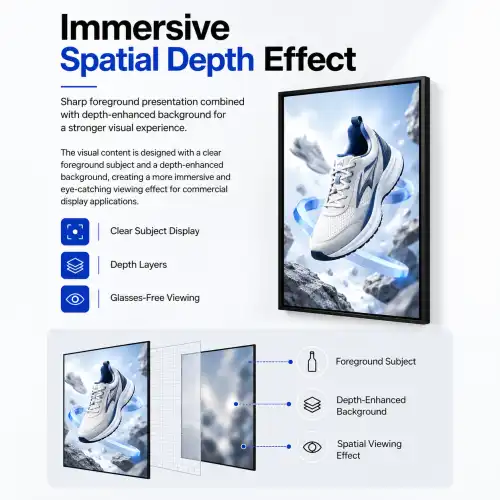
Glasses-free 3D displays achieve realistic depth perception by directing separate images to each eye simultaneously, triggering the brain's natural binocular vision response. This process, known as autostereoscopy, uses optical layers built directly into the screen—such as lenticular lens arrays or parallax barriers—to split light at precise angles. No glasses are required because the optics do the work that polarized lenses would otherwise perform. In commercial settings, a well-engineered 3d spatial signage display takes this further by applying a "2D subject, 3D background" rendering method, preserving sharp foreground resolution while delivering a convincing sense of spatial depth behind it.
Understanding Glasses-Free 3D Displays: How Do They Work?
The Role of Lenticular Lens Arrays
Over the screen, a lenticular lens array is made up of a sheet of precisely curved micro-lenses. Each lens bends light at a different angle, so the left and right eyes see images from slightly different points of view. The brain combines these two different images into a single sense of depth. A study in the journal Displays (Elsevier, 2019) showed that lenticular-based autostereoscopic screens can keep stable depth perception across a horizontal viewing cone of 60 degrees. This is in line with the 3D depth-of-field view standard found in commercial-grade spatial displays.
Parallax Barriers and Their Trade-offs
A parallax barrier is a layer of very closely spaced holes that can be put in front of or behind the LCD screen. It stops some pixels from reaching each eye, which has the same effect as a lenticular lens in terms of separating the two views. The trade-off is a small drop in peak brightness. This is why commercial spatial displays usually list brightness at 350 cd/m² or higher, with upgrades to 1,000 cd/m² available, to make up for the light loss caused by parallax optics.
The "2D Subject, 3D Background" Rendering Approach
The 3d spatial signage display avoids the common flaw of standard autostereoscopic TVs that split the whole frame into viewing zones and can make images less clear. This is exactly what its "2D subject, 3D background" approach does. The foreground item, such as a person, a product, or a brand image, is rendered at full 2K or 4K resolution, while the spatial depth layer is only applied to the background. This keeps the image clear in the areas where viewers' attention naturally falls, solving the blurriness issue that has traditionally made glasses-free 3D unsuitable for professional business display settings.
Benefits and Applications of 3D Spatial Signage Displays in B2B Sectors
Why Depth Perception Changes Buyer Behavior
Several retail studies have shown that showing products in three dimensions makes people more interested in buying them and makes them stay on the shelf longer. A person's opinion of a product's quality goes up significantly when they see a watch, backpack, or piece of jewelry drawn with real spatial depth, which means that it floats slightly off the screen surface within a 500mm depth-of-field space. This isn't a novelty effect; it's a normal psychological reaction to depth cues that can't be matched by flat digital signs.
Industry Applications Across Commercial Sectors
Because glasses-free 3D spatial screens are so flexible, they work well with a lot of different kinds of projects. Here are the most common rollout situations used in business:
- Luxury Retail: Jewelry and watch brands present products in 360-degree spatial depth, accentuating surface texture and material quality in ways that flat photography cannot achieve. This strengthens perceived product value at the point of sale.
- Museums and Exhibition Halls: Artifacts and specimens appear to "float" within the display frame, creating an interactive viewing experience without requiring physical handling. Long operating hours and flexible installation options—wall-mounted or floor-standing—make this practical for permanent and touring exhibitions alike.
- Shopping Malls and Airports: High-traffic venues benefit from the natural attention-catching property of depth-based visuals. A glasses-free display running at 1,000 cd/m² brightness holds visibility even in brightly lit concourses, delivering brand advertising and wayfinding content simultaneously.
- Corporate Showrooms and AV Integrations: HDMI input compatibility with optional Android or PC system configurations means these displays integrate cleanly into existing commercial AV setups without requiring proprietary hardware.
Each of these settings needs a different kind of display, with different brightness levels, mounting formats, and working times. A well-designed spatial screen can meet all of these needs with just one line of products.
Cost Efficiency and ROI for Procurement Teams
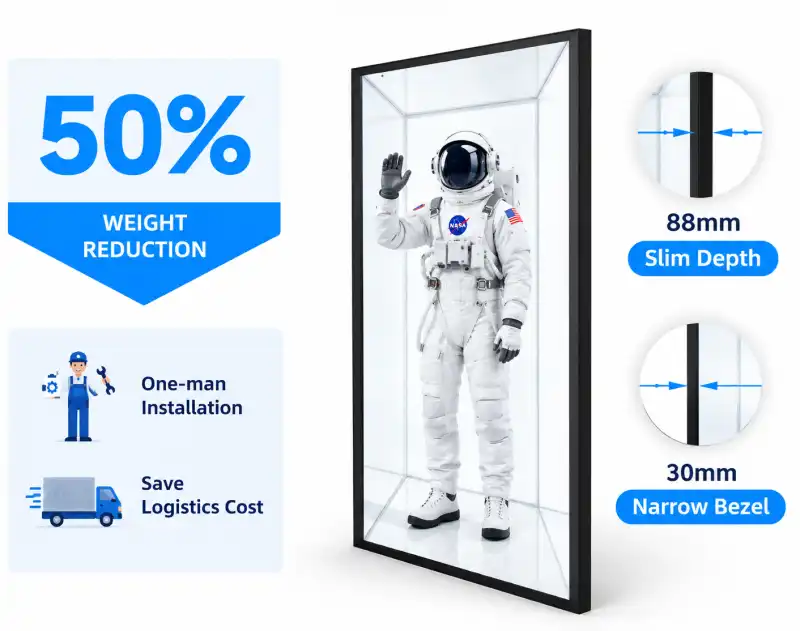
With a 60Hz working frequency, LED lights, and a contrast ratio of 1200:1, this screen gives you a lot of visual output without using a lot of power. Glasses-free displays have lower ongoing costs than standard projection-based 3D systems because they don't need to replace lamps or handle glass accessories. They also don't need the audience to work together. For purchasing managers looking at the total cost of ownership across multiple units, the operational savings over the course of three to five years are a real factor in the decision to buy.
Comparison: Glasses-Free 3D Spatial Signage vs. Traditional Signage and Other 3D Technologies
Against Flat Digital Signage
The 3d spatial signage display differs from standard LCD digital signage, whose images are shown in two dimensions. Standard LCD digital signage is well-known, cheap, and easy to find, but it doesn't give any depth cues at all. A glasses-free spatial display that shows the same content but renders it with more depth will always attract more attention in side-by-side tests. This is especially true in shopping and advertising settings with a lot of competition where visual distinction is important.
Against Holographic and Projection-Based 3D
Controlled atmospheric lighting is needed for holographic fan screens and rear-projection 3D systems to work well. Also, they are hard to fix mechanically and aren't as good for 24/7 business use. A glasses-free LCD-based spatial display, on the other hand, works with AC 110–220V input, can be mounted directly to a wall or floor stand, and doesn't need to be maintained as moving-part projection systems do.
Against Glasses-Required 3D Displays
People who want to use polarized or shutter-glass 3D systems must wear glasses. This is fine in a movie theater, but not so great in stores, airports, or show halls where people are moving around and won't stop to pick up and return their glasses. The autostereoscopic method gets rid of that problem completely, so anyone can see depth-based visual material without having to do anything.
How to Choose and Procure Glasses-Free 3D Spatial Signage Displays?
Define Your Technical Requirements First
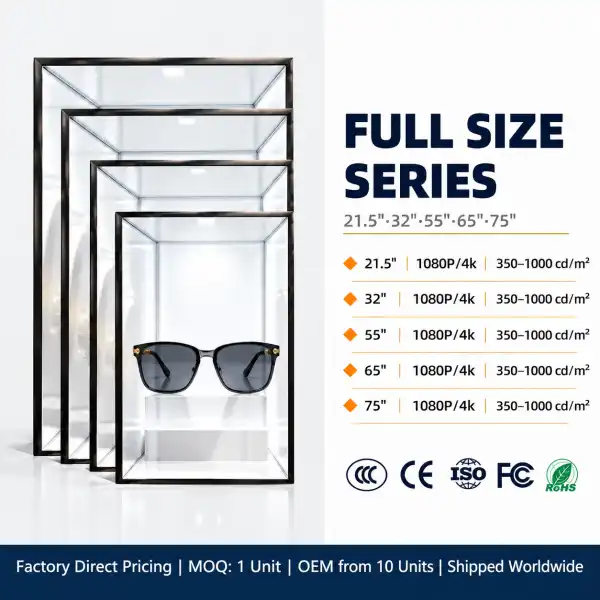
Before talking to any suppliers, procurement managers should know what the project's main requirements are. These include the screen size (21.5", 32", 55", or 86" are common sizes), the resolution (2K or 4K), the brightness needed for the room, and whether the installation will be wall-mounted or stand-alone. A viewing angle of 178° and a 3D depth-of-field view of 60° are good starting points for most business settings.
Evaluate Supplier Credentials and Support Capacity
The manufacturing infrastructure of a supplier is just as important as the product specification sheet. Multi-unit B2B orders can be handled more consistently by factories with dedicated production lines, in-house R&D teams, and established after-sales engineering capacity than by trading companies that don't have direct control over manufacturing. OEM and ODM capabilities, such as custom sizing, logo application, and system configuration, are necessary for digital signage integrators and projects commissioned by brands.
Assess Customization and Integration Options
For AV installers and digital signage project managers, the ability to use HDMI inputs and the choice of Android or PC system boards are often what makes the difference. Whether a display fits perfectly into a project specification depends on its anti-glare treatment (HAZE 25% is optional), its brightness that can be set to 1,000 cd/m², and its ability to be used in portrait or landscape mode. Before you sign off on a buy order, make sure the supplier agrees to these choices.
Future Trends in Glasses-Free 3D Spatial Display Technology
AI-Assisted Content Rendering
In the past, specialized development work was needed to prepare content for autostereoscopic screens such as the 3d spatial signage display. AI-based modeling tools are cutting that process down a lot, so brands can make depth-ready content from regular footage without having to manually convert each frame. With this change, brands with normal production costs will be able to get glasses-free 3D more easily.
Higher Resolution and Wider Viewing Zones
The 3D depth sense of commercially available displays is steady across a 60-degree horizontal cone. Optical engineering work is currently expanding this area and raising the sharpness per eye. This will fix the main technical issue with autostereoscopic technology and make it more useful in more situations.
Integration with IoT and Content Management Systems
As commercial display networks get bigger, it becomes important to be able to update 3D content from afar and schedule playback on multiple screens through a central content management system (CMS). Displays with Android or PC system boards are already set up to connect to networks in this way, and over the next few years, this feature will be required by most B2B buying requirements.
Conclusion
The 3d spatial signage display achieves its depth effect through optical physics—lenticular lenses, parallax barriers, and binocular parallax rendering—along with smart content strategies that keep resolution where it matters most. For business-to-business users, the technology has hit a point where it provides uniform visual performance, easy installation choices, and real business benefits in a variety of settings, such as retail, exhibition, advertising, and corporate. The important thing is to choose the right screen specs and a manufacturer that can help you with your project from the planning stages to the final product.
FAQ
Q1: Are glasses-free 3D displays suitable for outdoor or high-brightness environments?
Yes. Commercial spatial displays with optional brightness configurations reaching 1,000 cd/m² are suitable for brightly lit indoor environments such as airport concourses, shopping mall atriums, and showroom floors. For fully outdoor deployments, confirm with your supplier that the specific unit meets the brightness and environmental protection requirements for your location.
Q2: What is the expected operational lifespan of a commercial spatial display?
With LED backlighting and standard commercial-grade components, a well-maintained glasses-free 3D display typically operates reliably for five to seven years before brightness degradation becomes noticeable. Operating hours, ambient temperature, and ventilation conditions all affect longevity.
Q3: Can existing video content be used on a glasses-free 3D display?
Standard video files cannot be directly converted into 3D spatial content. The display's depth effect requires content specifically prepared in the "2D subject, 3D background" format. Most commercial suppliers can advise on content production partners or provide content guidelines for your media team.
Q4: What customization options are available for B2B orders?
Custom screen sizes, logo application (silk screen or LED backlit), power-on branding, color options, and system board configurations (HDMI, Android, PC) are all available. OEM and ODM projects are accepted with no minimum order quantity requirements on customization.
Ready to Source a 3D Spatial Signage Display? Contact Topview
Topview has been making business LCD advertising screens in Shenzhen for more than 13 years. They have a 2,000-square-meter factory with three production lines and a research and development team of ten people. We offer OEM/ODM customization, low bulk prices, and committed after-sales support for B2B projects of any size as a direct 3d spatial signage display maker. Whether you need a single demo unit or a deployment across multiple sites, our team can help you find the right specs for your project. You can ask for a quote by emailing market@tviewdisplay.com.
References
1. Dodgson, N. A. (2005). Autostereoscopic 3D Displays. Computer, IEEE Computer Society.
2. Holliman, N., Dodgson, N., Favalora, G., & Pockett, L. (2011). Three-Dimensional Displays: A Review and Applications Analysis. IEEE Transactions on Broadcasting.
3. Urey, H., Chellappan, K. V., Erden, E., & Surman, P. (2011). State of the Art in Stereoscopic and Autostereoscopic Displays. Proceedings of the IEEE.
4. Lambooij, M., IJsselsteijn, W., Fortuin, M., & Heynderickx, I. (2009). Visual Discomfort and Visual Fatigue of Stereoscopic Displays. Journal of Imaging Science and Technology.
5. Kim, J., & Lee, B. (2018). Viewing Zone Analysis for Autostereoscopic Lenticular Displays. Displays, Elsevier.
6. Digital Signage Federation. (2022). Digital Signage Industry Market Research Report. Digital Signage Federation Publications.
YOU MAY LIKE
 VIEW MORESmart Solar Furniture Bench
 VIEW MOREDouble Cube Solar Smart bin
 VIEW MOREPluggable OPS PC
 VIEW MORESingle Sided High Brightness Windows Facing Displays
 VIEW MOREFoldable LCD Digital Signage Player
 VIEW MOREWall-Mounted Outdoor Displays
 VIEW MOREWall-Mounted Outdoor LCD Digital Signage
 VIEW MOREOutdoor Double Sided Digital Signage