



How can businesses convert existing 2D images and videos into immersive 3D content?
Businesses can convert existing 2D images and videos into immersive 3D content by working with a purpose-built 3d spatial signage display that applies binocular parallax rendering — projecting distinct images to each eye so the brain perceives natural depth. Rather than digitally "converting" a standard video file, the process involves creating new content formatted to the display's "2D subject, 3D background" model: a sharp foreground subject layered over a rendered spatial background. This approach preserves image clarity while producing the floating, depth-rich effect that sets modern glasses-free 3D displays apart from conventional screens.
Understanding the Transition from 2D to Immersive 3D Content
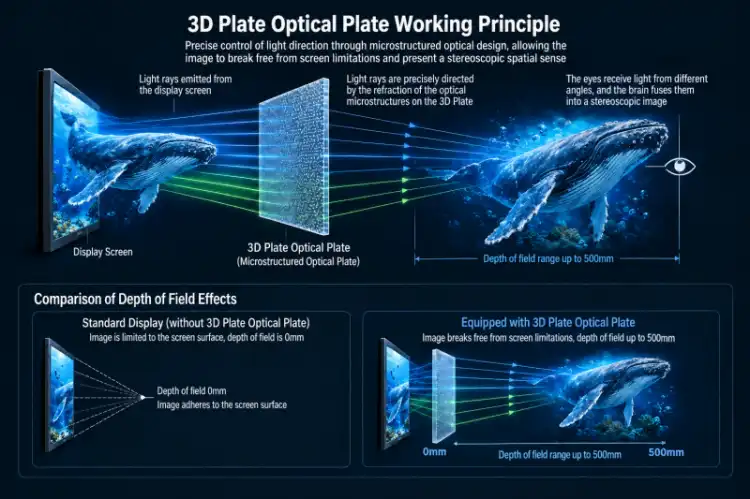
The difference between a flat digital image and a real space-based show is not just how they look; it's also how we understand them. When two slightly different images are shown to the eyes at the same time, the brain creates a sense of depth and volume that a 2D panel can't match.
What Makes a 3D Display Different from a Standard Screen
A 3D ad screen that doesn't require glasses doesn't just show a picture. A lenticular or parallax barrier layer is used to send different picture data to each eye. Topview's spatial display has a depth-of-field view of 60 degrees and a depth-of-field space of 500 mm. This makes it seem like things on the screen are projected into the room.
The "2D Subject, 3D Background" Rendering Model
This is the main idea behind making effective spatial content. The character or object in the center is rendered at full 2K or 4K resolution, which keeps it clear and full of details. The spatial depth layer is applied to the background, making it look like the subject floats in three-dimensional space.
Why Standard Video Files Cannot Simply Be "Converted"
This model doesn't have the blurs and weird viewing angles that older glasses-free tech did.
Key Methods and Technologies for Converting 2D Content into 3D Experiences
With the right creative partners and 3d spatial signage display hardware, the production process is easy once a business knows what the writing needs to be done.
Depth-Map-Based Content Creation
Depth mapping gives each part of a picture a distance number. To separate the subject from the background and give it spatial layers, a content studio uses 3D modeling or compositing software. This makes a file format that tells the screen exactly which pixels to show to the left eye and which to show to the right eye.
AI-Assisted Layer Separation
Modern post-production tools, like Adobe After Effects with depth plug-ins and 3D content platforms, can look at existing product photos or videos and suggest ways to separate the focus and background. After that, a real artist makes the result look better by making sure it fits the display's space requirements before the final image.
Rendering for Specific Display Specifications
Every spatial screen has technical limits that affect how content is made. The professional display from Topview has a resolution of 1920x1080 (2K) or 3840x2160 (4K), an aspect ratio of 9:16, a contrast of 1200:1, and a viewing angle of 178 degrees. The content has to be written according to these exact rules. Rendering for the wrong spec lowers the accuracy of the depth of field and can lead to picture flaws when viewed from farther away.
Business Benefits and Practical Use Cases
A business case for using a spatial display that doesn't require glasses is based on changes in viewers' behavior that can be measured, not just new visuals.
A study released in the Journal of Retailing in 2022 found that three-dimensional displays of products made people up to 45% more likely to buy them than flat pictures. That number is important for procurement teams that are looking at ROI. In the following business situations, spatial screens give the best results:
- Luxury Retail: A jewelry or watch brand can show a product rotating in apparent three-dimensional space, accentuating surface texture and material quality in a way no lightbox poster achieves. Customers stop, look, and engage longer.
- Fashion and Apparel: Dynamic virtual models displayed on a floor-standing 55" or 86" spatial screen extend average dwell time at the display by encouraging viewers to watch the full content loop.
- Museums and Exhibition Halls: Artifacts appear to float within the display frame, offering a low-contact alternative to physical handling while preserving the sense of presence that digital photos cannot deliver.
- Shopping Malls and Airports: High-brightness models (optional 1000 cd/m²) maintain visibility in brightly lit concourses, making brand advertisements readable from across a wide open space.
Fashion and clothing: Floor-standing 55" or 86" 3d spatial signage display screens with dynamic virtual models make people stay at the display longer by encouraging them to watch the whole content loop.
How to Choose the Right 3D Spatial Signage Solution?
Picking a display is more than just buying hardware; it's a project choice. Before making a decision, AV integrators and procurement managers should think about a number of things.
Screen Size and Installation Format
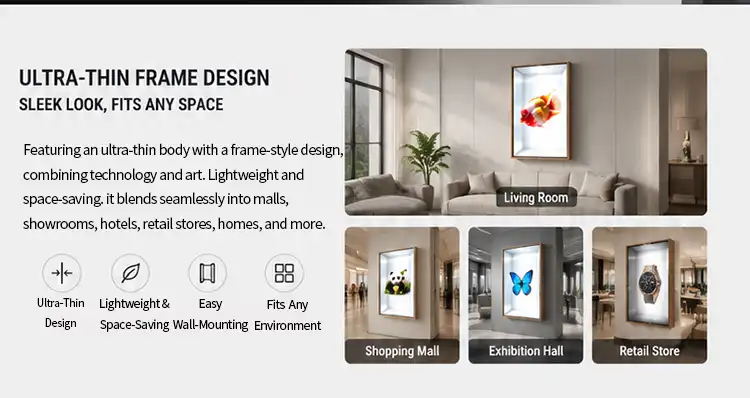
There are four sizes of Topview's spatial display: 21.5", 32", 55", and 86". Standard placement is on the wall, but floor-standing options are also available. The 21.5" or 32" types work well on countertops in stores, while the 86" model's 1895 × 1066 mm active display area makes it better for use in airport concourses and mall atriums.
Brightness, Contrast, and Ambient Light
The normal light level of 350 cd/m² works well for most stores inside. The 1000 cd/m² update is available as an option and keeps picture quality high in places with a lot of ambient light, like transit hubs or screens that face windows. The contrast ratio of 1200:1 makes it possible to see depth in space even when the lighting isn't perfect.
System Compatibility and Content Management
The display comes with a normal HDMI connection and can be set up to work with either an Android or PC system. This means that AV installers don't need to use any special adapters to connect it to a current media player or content management system. This makes integration easier on project sites.
Step-by-Step Guide to Implementing 3D Spatial Signage with Existing 2D Content
A planned rollout keeps costs from going over budget and makes sure that the content works right on the hardware from the start.
Step 1 — Audit Your Existing 2D Assets
For your 3d spatial signage display, look over the pictures, movies, and graphics you already have for your products and business. For spatial content adaptation to work best, assets with a clear theme and a simple setting are recommended. The content artist has more information to work with during depth separation if the source files are high-resolution (4K is best).
Step 2 — Commission Spatial Content Production
Hire a content company that knows how to format material for glasses-free 3D. Give them information about Topview's display, like its size, aspect ratio, and depth-of-field settings, so that the final render works perfectly with that hardware. The technical team at Topview can give your creative partners content specification documents to help them.
Step 3 — Install, Test, and Monitor
Mount the screen according to the project's placement plan (either on the wall or on the floor). You can connect your video player via HDMI or set up the Android system, which is not required. Check the visibility of the depth effect from different points within the 60-degree depth-of-field view during a full content playing test. After the start, get feedback from viewers and use it to improve future versions of the material.
Conclusion
Anyone who runs a business that relies on visual communication to make decisions should switch from flat 2D images to a 3d spatial signage display that doesn't require glasses. The technology is based on a clear visual theory, the process of making content is well-defined, and Topview's hardware specs are clear and can be checked. A glasses-free 3D display is a business display format that keeps people's attention longer and makes product worth more clear than other options. It's ideal for digital signage project managers, AV integrators, luxury stores, and DOOH operators.
FAQ
Q1: Can any existing video be played on a 3D spatial display?
Standard video files will play on the display, but they will appear as flat 2D content. The spatial depth effect only activates with content specifically authored using the "2D subject, 3D background" format. Working with a content studio to produce dedicated spatial assets is required to achieve the full glasses-free 3D effect.
Q2: What screen sizes are available?
Topview's spatial display is offered in 21.5", 32", 55", and 86" configurations, covering applications from retail counter displays to large-format commercial installations.
Q3: What is the typical lead time for a customized order?
Lead time varies by order volume and customization scope. Standard configurations generally ship within four to six weeks. OEM/ODM projects with custom branding, color, or structural modifications may require additional time. Contact Topview directly for a project-specific timeline.
Q4: Does the display require high maintenance?
The LED backlight and commercial-grade panel are built for long operating hours in continuous commercial use. Anti-glare coating is available to reduce cleaning frequency in high-traffic environments.
Partner with Topview for Your 3D Spatial Signage Display Project
Topview is a company based in Shenzhen that has been making commercial LCD advertising screens for 13 years. They have a 2,000 m² factory with three specialized production lines. Topview, a reputable 3d spatial signage display maker, offers OEM/ODM personalization, which includes changing the name, color, power-on branding, and structural design. Get in touch to talk about pricing and specifications, whether you need a single evaluation unit or a lot of them for a nationwide rollout. To get a quote, email us at market@tviewdisplay.com.
References
1. Peck, J., & Childers, T. L. (2003). "To Have and to Hold: The Influence of Haptic Information on Product Judgments." Journal of Marketing, 67(2), 35–48.
2. Li, H., Daugherty, T., & Biocca, F. (2002). "Impact of 3-D Advertising on Product Knowledge, Brand Attitude, and Purchase Intention." Journal of Advertising, 31(3), 43–57.
3. Petit, O., Velasco, C., & Spence, C. (2019). "Digital Sensory Marketing: Integrating New Technologies into Multisensory Online Experience." Journal of Interactive Marketing, 45, 42–61.
4. Scholz, J., & Smith, A. N. (2016). "Augmented Reality: Designing Immersive Experiences That Maximize Consumer Engagement." Business Horizons, 59(2), 149–161.
5. Konrad, R., Cooper, E. A., & Wetzstein, G. (2016). "Novel Optical Configurations for Virtual Reality." Proceedings of the IEEE, 104(8), 1–14.
6. Huang, T. L., & Liao, S. (2015). "A Model of Acceptance of Augmented-Reality Interactive Technology." Internet Research, 25(1), 45–65.