



What is the difference between commercial indoor and outdoor digital signage?
The distinction between commercial indoor and outdoor digital signage lies in the environmental, technical, and performance requirements. Indoor displays are used in climate-controlled environments where the lighting conditions are steady; therefore, the priority is colour accuracy and resolution. Outdoor digital signage, however, has to deal with direct sunlight, rain, dust and temperature changes, while yet being easily visible to audiences passing by. The hardware specs are very different between the two: brightness, IP certification, glass type, thermal management. Choosing the wrong type of deployment location will lead to premature failure, budget waste, and poor audience engagement.
Understanding Commercial Indoor vs. Outdoor Digital Signage
Before you compare specs, it helps to know where each type of display lives and what it does all day.
What Indoor Digital Signage Is Designed For?
Indoor commercial displays are utilised in places such as malls, corporate lobbies, retail stores, and conference rooms. They work under controlled lighting and need just moderate brightness, roughly 300 to 700 units. It’s all about colour fidelity, wide viewing angles, and great resolution for individuals who are close up. The temperature and humidity are always the same inside; thus, enclosures are lighter and need less ventilation.
What Outdoor Digital Signage Must Withstand?
The rules are very different in regard to outdoor shows. Every day they have to contend with direct sunlight, rain, road dust, chilly winters, and sweltering summers. A screen that works perfectly in an air-conditioned hallway will stop working in a few weeks if you put it up on a sign or at a transit hub. When engineers design outdoor units, they have to consider how well they will perform with a sun load of more than 1,000 W/m2. Vandalism and operating all the time, 24 hours a day, seven days a week.
Real-World Deployment Scenarios
Outdoor digital signage is commonly installed by purchasing managers on highway billboards, stadium walls, airport exteriors, and drive-through menu boards. Indoor displays can be found on store shelves, in hotel lobbies, on video walls in command centres and in workplace reception areas. The first and most crucial thing to do when buying an item is to ensure that the type of display is suitable for the space.
Key Technical Differences Between Indoor and Outdoor Digital Signage
It's easier to compare the engineering differences to your project requirements once you know how the deployment will work.
Brightness and Optical Performance
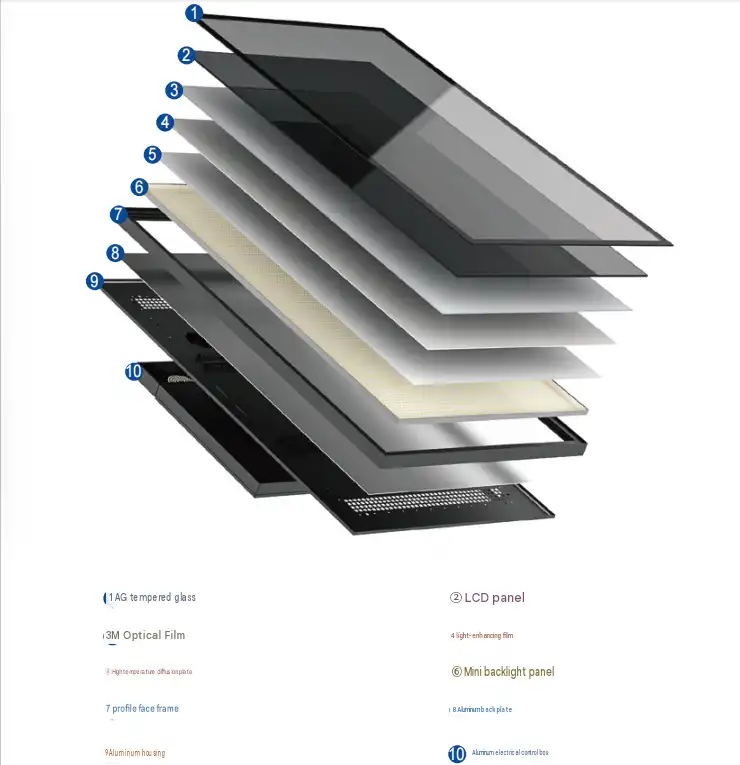
Outdoor screens need at least 1,500 nits to stay visible in direct sunlight. Newer models get up to 4,000 nits. The solar-powered T32SO, T43SO, T49SO, and T55SO models from Topview have brightness levels between 1,500 and 2,000 nits and an advanced photosensitive probe that changes brightness automatically in real time. This saves energy and keeps screens from wearing out too fast. Virtually all UV rays are blocked by the 6mm AR-coated layered glass, which also lets more than 97% of light through and reflects less than 3%. Panels inside rarely go over 700 nits because the light inside is steady most of the time.
Enclosure and Weather Protection
Outside shelters are made from 1.5 mm galvanised steel plate and have a powder finish that is meant to be left exposed to the weather. This makes the shell last longer than seven years. It's dust-proof and water-tough if it has an IP65 or IP66 rating. The 6mm double-sided strengthened AR glass can't be broken into and is still clear after being hit. For indoor enclosures, thinner materials are used since they don't need to protect against weather and theft.
Thermal Management and Operating Temperature Range
The T32SO–T55SO series uses military-grade technology to get rid of heat and has a smart straight-wind temperature control system. The LCD substrate works in temperatures ranging from -30°C to 110°C, which stops isotropic failure, which is a black-spot defect caused by too much sun, during the summer months. Even when the outside temperature reaches 45°C, the cooling system keeps the inside temperature between 5°C and 25°C. Indoor screens don't need to meet this standard because they use inactive or very little active cooling.

Comparative Performance and Cost Analysis
When procurement teams know the total cost of ownership, they can explain why outdoor-grade equipment costs more at first.
Energy Consumption and Sustainability
A3_007: Outdoor screens use more power because their backlights are brighter and their cooling systems work harder. This is exactly what the T32SO/T43SO/T49SO/T55SO series does: it runs on solar power 24 hours a day, seven days a week, and there is no need for wiring or connecting to the power grid. The built-in solar battery can do deep cycles and uses gel electrolyte technology to last a long time in high-altitude and high-temperature settings. This method lowers the cost of energy used for operations to zero while also helping companies meet their green goals.
Total Cost of Ownership
Outdoor digital signage costs more up front than indoor commercial displays. Total cost of ownership, on the other hand, gives a fuller picture. Topview's outdoor series comes in sturdy wooden boxes and comes with a standard one-year warranty that can be extended to three years if needed. It also comes with free technical support for life, even after the warranty period is over. The lead time is between 5 and 15 business days. When the costs of repairs and replacements are taken into account, an outdoor unit that is properly specified always gives better value over its lifetime.
After-Sales Support as a Cost Factor
When purchasing from makers that don't offer after-sales help, purchasing managers often have to pay extra for repairs or faster replacements, which aren't always obvious. Topview has two specialized after-sales engineers who offer free technical support for as long as the device is in use. One of the most common problems with buying displays across borders is taken care of by this embedded support model.
How to Choose the Right Digital Signage for Your Business Needs?
It's not always clear which type of display technology to use indoors or outdoors, especially in semi-covered or transitional areas like covered bus stops or atriums with glass walls.
Assess the Physical Environment First
To begin, check out the website. Write down the brightest daylight hours, the coldest and warmest temperatures during different seasons, and the amount of dust and rain that you are exposed to. Although it may be partly covered, the panel needs to be outdoor-rated if it will be in direct sunlight for more than four hours a day. A solar panel should be able to start up from -30°C if the temperature where it will be installed drops below -10°C in the winter. The T32SO–T55SO series can start up successfully from -30°C.
Match Technical Specifications to Application Requirements
Plan how to meet specifications after keeping track of environmental data. There should be more than 1,500 nits of brightness, an IP65 rating or higher for waterproofing, and a 1920x1080 screen size for public advertising signs and transit stops. Storefronts and meeting rooms usually work well with a 400–700 nit panel that shows colours accurately and has a wide viewing angle. OEM and ODM projects can be handled by Topview, and customisation doesn't require a minimum order quantity. The screen size, cabinet colour, resolution, and software can all be changed to fit the project perfectly.
Evaluate Supplier Capability Alongside Product Specs
Anyone who made the screen is responsible for its quality. Highview has a 2,000-square-meter clean-room factory in Shenzhen with three skilled production lines that can make 100 units every day. An average of eight years of experience with LCDs is shared by the more than ten engineers on the R&D team. Products that have been certified by organisations such as CE, FCC, and RoHS meet the foreign standards needed to sell in the US market and compete for government contracts.

Practical Procurement Guide for B2B Clients
A structured procurement process keeps costs and schedules safe for both small installations and large-scale rollouts.
Define Scope Before Requesting Quotes
When you send a quote request for outdoor digital signage, you should include the screen size range, the brightness that is needed, the number of hours that the screen will be used each day, the content format (video, static picture, or interactive), and any software integration needs. With this much information, the manufacturer can give you a good price quote and avoid having to make pricey changes to the specs while the product is being made.
Negotiate Terms That Protect Long-Term Value
If a seller makes an offer, don't just look at the price per unit. Know what the guarantee covers and how long it lasts. If something goes wrong with Topview's parts, materials, or the way they were made, the guarantee covers it. Write down the wait times and agree on the terms of payment (TT is common). Also, agree on the standards for packaging (for example, reinforced wooden cases for international freight). Talk about delivery schedules that are spread out and work with installation goals for big jobs.
Plan for Ongoing Maintenance
Digital screens outside need to be serviced every so often, even if they are well-built. Every three months, have someone look over the enclosure seals, air screens, and glass to make sure they are in good shape. Topview's T-series panels have a built-in network content management system that lets them handle remote content updates, timed on/off times, and offline viewing. This means that service calls to the panel's location are made less often. Before you set the final specs, make sure that your CMS platform works with the player board that's built into the panel.
Conclusion
Both indoor and outdoor digital signage are used to communicate visually, but they are not the same in almost every way. For outdoor use, brightness, temperature control, the stability of the housing, and power management all get a lot better. When you buy something, making sure these specs are met correctly can save you a lot of money on repairs and keep your display networks going smoothly in all kinds of weather and at all times of the day and night. Whether you are looking for displays for a store chain, a public transportation system, or a large-scale outdoor advertising network, the best way to make an investment is to match your technical needs with a maker who has the right certifications and will support your project after delivery.
FAQ
Q1: Can an outdoor display be used indoors?
In a technical sense, yes, but it rarely makes sense financially. Outdoor panels are over-engineered for use indoors, so they use more power than they need to and cost a lot more up front. The amounts of light that work well in sunny areas are too bright and uncomfortable inside. Unless you are in a place inside that has a lot of natural light, like an atrium with floor-to-ceiling glass, an indoor-grade panel is preferable.
Q2: How often does outdoor signage need maintenance?
Plan for at least three inspections per year. Check the seals on the enclosure, clean the air screens, look for chips on the glass, and make sure all the electrical connections work. Inspections should be done every six to eight weeks in coastal or high-humidity areas. It's better to do preventative maintenance on well-built units like the T32SO–T55SO series, which have IP65 enclosures and high-precision filter systems, so they don't need as much corrective maintenance.
Q3: What software manages content on these displays?
The T-series panels from Topview have a network information release system built in that works with text, video, and picture formats. It links via a cable network, lets you play music when you're not online, and comes with server control software for easy scheduling. Control for automatic on/off at set times is built in. This method works with common content management systems (CMS) that media companies and stores use, which makes it easy to connect to current digital signage networks.
Get a Direct Quote from Topview — Trusted Outdoor Digital Signage Manufacturer
From its factory in Shenzhen, Topview Technology has been making commercial display solutions for more than 13 years. Since we are the direct maker of outdoor digital signage, we can offer panels that are CE/FCC/RoHS-certified, OEM customization, and factory-direct prices with no minimum order quantity limits for custom orders. Get in touch with our team right away to get details, bulk pricing, and help with your project. Send an email to market@tviewdisplay.com.
References
1. Digital Signage Federation. Digital Signage Best Practices Guide. Digital Signage Federation, 2022.
2. AVIXA. AV Industry Outlook and Compensation Report. AVIXA, 2023.
3. IEC. IEC 60529: Degrees of Protection Provided by Enclosures (IP Code). International Electrotechnical Commission, 2022.
4. Grand View Research. Digital Signage Market Size, Share & Trends Analysis Report. Grand View Research, 2023.
5. Society for Information Display. Display Technology Fundamentals and Applications. Wiley-SID Series, 2021.
6. DSCC (Display Supply Chain Consultants). Global Display Technology & Market Forecast Report. DSCC, 2023.