



What is the difference between a spatial display, holographic display, and traditional 3D display?
When evaluating next-generation display technology for commercial projects, understanding the distinction between a spatial display, a holographic display, and a traditional 3D display is essential. A 3d spatial signage display uses binocular parallax and depth-field rendering to produce glasses-free 3D visuals directly on an LCD panel — no projectors or special glasses required. A holographic display reconstructs light wavefronts to create free-floating images. Traditional 3D displays use anaglyph or polarized methods that require viewer accessories. Each technology serves different commercial scenarios, budgets, and installation requirements.
Understanding 3D Spatial Signage Displays: Definition and Working Principles
Not every "3D" screen is made to work the same way. A glasses-free spatial display is a very different type of product, and people who work in procurement need to know what goes on inside the panel.
How Binocular Parallax Creates Depth
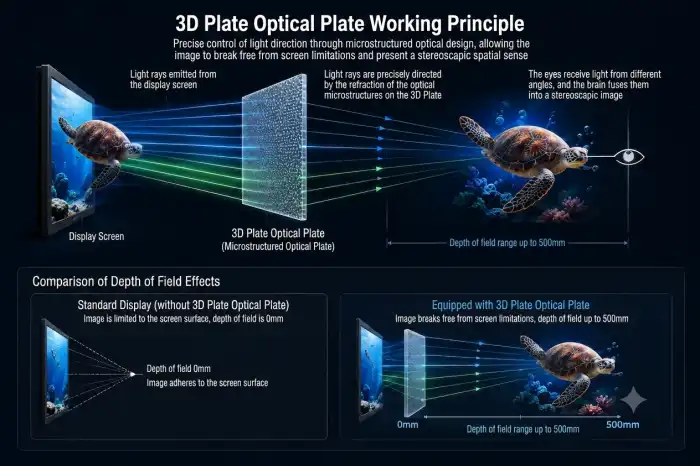
A spatial display shows different angles of images to both eyes at the same time. The brain gets two pictures that are slightly off from each other and easily figures out how far apart they are. This is the same way that natural vision works. You don't need a headset, glasses, or an additional projection.
The "2D Subject, 3D Background" Rendering Method
This technology shows the subject in the center in clear 2D resolution while adding depth-field effects to the background to keep the picture sharp. Older glasses-free panels had trouble with the classic trade-off between 3D depth and visual clarity. This method fixes that problem. The end result is a display that can be sold and keeps both its depth and resolution.
Technical Specifications Worth Knowing
Topview's commercial spatial display comes in 21.5", 32", 55", and 86" sizes and two resolutions: 1920x1080 (2K) and 3840x2160 (4K). The panel has a viewing angle of 178°, a depth-of-field view of 60° in 3D, and a depth-of-field space of 500mm. These are all useful numbers for sign builders who are planning watching areas. The default brightness level is ≥350 cd/m², but you can choose to increase it to 1000 cd/m² for places with a lot of ambient light. The system can accept AC110–220V input voltage and can connect to either an Android or a PC via HDMI.
Deconstructing Holographic Displays: Technology and Applications
Unlike a 3d spatial signage display, holographic screens are in a different market segment; they usually cost more and can only be used in certain situations.
Light Interference and Wavefront Reconstruction
In real holography, the pattern of light that bounces off of an object is recorded and played back. When the image is put back together, it looks like a three-dimensional picture that can be seen from different angles without glasses. The physics behind holography, like diffraction and interference, are well known in visual science and set it apart from LCD-based methods.
Where Holographic Displays Are Used
Holographic sets are popular at big brand events, entertainment shows, and experiences that combine AR and VR. They make a big visual effect at product launches and temporary shows, but they are much more expensive to set up and require a lot more content production than spatial display options.
Limitations for Mainstream Commercial Deployment
Holographic displays have real problems in normal business settings like stores, airports, and museum galleries. Usually, they need controlled ambient light, certain room layouts, and special workflows for making content. These things add a lot of extra work for a buying manager who is looking at the total project cost across multiple sites.
Traditional 3D Displays Explained and Their Limitations
It used to be that traditional 3D technology was the standard, but these days it's not really useful for business.
Types of Traditional 3D Display Systems
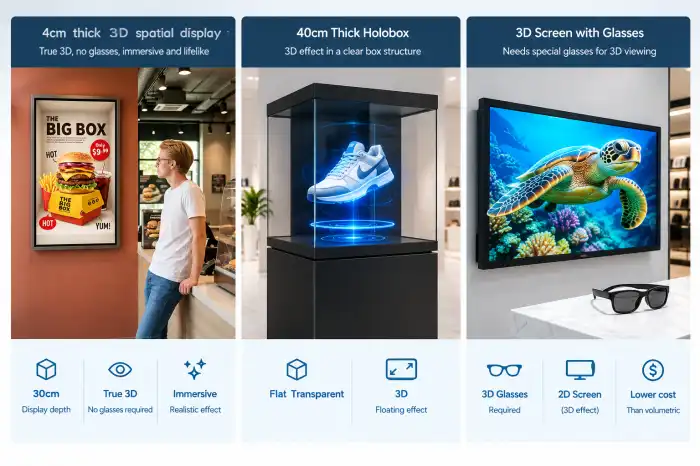
Anaglyph glasses (red-cyan glasses), polarized glasses (passive glasses), active shutter glasses (battery-powered glasses), and lenticular lens panels are the main types. Each one creates a binocular effect, but either you need extra parts or the quality of the image is significantly lower.
The Glasses Problem in Commercial Settings
Making people who are visiting, shopping, or riding the bus wear glasses makes viewing more difficult. Keeping track of, cleaning, and handing out glasses is a lot of work in places with a lot of foot traffic. Optometric literature also has a lot of information about how long-term use can cause viewer discomfort, such as eye strain and headaches.
Declining Role in Modern Signage Projects
Most standard 3D screens have a narrow viewing angle, which makes it hard to move them around in real life displays, unlike a 3d spatial signage display. Since alternatives that don't require glasses have gotten better at brightness and resolution, it's become harder to use traditional 3D systems in new business projects. A lot of AV integrators have already stopped using these formats in places like airports and shopping malls.
Comparative Analysis: Spatial vs. Holographic vs. Traditional 3D Displays
To pick one of these three tools, you need to look at performance, cost, and how well it fits your business needs. Here is an organized comparison of the things that buying teams care about the most:
- Glasses-free operation: Spatial displays and holographic systems are both glasses-free. Traditional 3D typically requires accessories, adding cost and friction at scale.
- Resolution and image clarity: Spatial displays using the 2D-subject/3D-background method retain high panel resolution. Traditional 3D systems often sacrifice sharpness to produce depth effects.
- Installation flexibility: Spatial displays support wall-mounted and floor-standing configurations with standard HDMI inputs, making them straightforward to integrate into existing AV infrastructure. Holographic setups typically require custom spatial planning.
- Content requirements: Spatial displays work with purpose-produced content optimized for depth-field rendering. Standard video files cannot be directly converted into 3D spatial content — this is an important specification to communicate to clients.
- Operating cost: LED-backlit spatial panels with long-hour commercial ratings present lower ongoing maintenance costs compared to projection-based holographic systems.
These differences have a direct effect on what technology is best for a certain type of job. A shopping mall owner who wants to be open 18 hours a day and make it easy to change the content will find a spatial display much more useful than a holographic installation. For maximum visual excitement, an event contractor setting up for a three-day product launch might look into holographic choices.
How to Choose the Right 3D Display Technology for Your Business Needs
When making these kinds of purchases, it's better to use an organized evaluation process instead of just focusing on the specs.
Match the Technology to the Venue Type
3d spatial signage display are useful in places like stores, airports, and museums because they work all the time, need wide viewing angles, and need to work reliably in normal lighting. A report from 2022 by Grand View Research said that the global digital signage market was worth USD 24.8 billion. In retail and public venues, glasses-free 3D formats were very popular. This shows how people really buy things, not how marketers think people will buy things.
Evaluate Content Workflow Before Committing
When buying displays, the cost of making content is often not taken into account. For a spatial display to work, the content needs to be specially optimized. Once the workflow is set up, though, the same assets can be used on a variety of screen sizes. Holographic systems usually need content builds that are tailored to each project, which raises the cost of content per installation.
Vet the Supplier on Technical Support and Customization
For sign integrators buying in bulk, long-term supply security and OEM/ODM capabilities are just as important as panel specs. A manufacturer with in-house R&D, production, and tech help after the sale greatly lowers the risk of a project.
Conclusion
In the market for business screens, spatial displays, holographic displays, and regular 3D systems all have their own place. For most business signage projects, a 3d spatial signage display is the best mix of visual impact, ease of installation, and cost-effectiveness. Holographic screens work well in high-cost, controlled environments. As technology that doesn't require glasses gets better, older 3D formats are becoming less useful. Understanding these differences is the first step for procurement professionals looking at display technology for use in retail, AV integration, museums, or digital out-of-home (DOOH) applications.
FAQ
Q1: What is the main difference between a spatial display and a holographic display?
A spatial display uses visual parallax on an LCD screen to make depth effects that don't need glasses and don't need any special setup. A holographic display uses diffraction physics to put back together light wavefronts. This usually makes pictures that float in space, but it needs more complicated sets. Holographic displays are often used at events and for fun, while spatial displays work better for ongoing business use.
Q2: Can standard video content be played on a 3D spatial display?
You can't directly turn regular video files into 3D spatial content. For the depth effect to work, you need custom content that separates the subject in the foreground from the 3D background. This is an important thing to think about when making a content management plan.
Q3: What screen sizes are available for commercial spatial displays?
There are four sizes of commercial spatial displays: 21.5", 32", 55", and 86". These sizes cover most needs in stores, museums, and public places.
Q4: Is a 3D spatial display compatible with standard AV systems?
Yes. These screens accept HDMI input and can work with either Android or PC systems. They also accept AC110–220V input, which makes it easy to connect them to your existing AV system.
Partner With Topview for Your Next 3D Spatial Signage Display Project
With full OEM/ODM capability, custom branding, and no minimum order number for customization, Topview Technology, based in Shenzhen, manufactures business 3d spatial signage display options in four different screen sizes. Our 2,000 m² production center, 20+ engineers, and committed after-sales team help with projects from the beginning, when they are being planned, to the end, when they are being used. Contact us at market@tviewdisplay.com to get specs or a project consultation, whether you are buying as a 3d spatial signage display supplier partner or looking at products for a new project.
References
1. Grand View Research. (2022). Digital Signage Market Size, Share & Trends Analysis Report. Grand View Research.
2. Dodgson, N. A. (2005). Autostereoscopic 3D displays. IEEE Computer, 38(8), 31–36.
3. Urey, H., Chellappan, K. V., Erden, E., & Surman, P. (2011). State of the art in stereoscopic and autostereoscopic displays. Proceedings of the IEEE, 99(4), 540–555.
4. Gabor, D. (1948). A new microscopic principle. Nature, 161(4098), 777–778.
5. Bimber, O., & Raskar, R. (2005). Spatial Augmented Reality: Merging Real and Virtual Worlds. A K Peters/CRC Press.
6. Display Supply Chain Consultants (DSCC). (2023). Annual Display Industry Report: Emerging Technologies and Commercial Applications. DSCC.